





Direct Investment option
Want more control of your super?
With the Direct Investment option (DIO), you can build a self-managed portfolio within your CareSuper account.
Invest directly in S&P/ASX 300 shares, ETFs, LICs and term deposits for greater flexibility and less admin.
Invest your way with confidence


Who can invest in the DIO?
To be eligible for the DIO, you must have:
- A minimum super account balance of $20,000
- A CareSuper super account or a Flexible Income account
- Access to Member Online
- An email address recorded on your account
If you meet these requirements, you can start taking control of your super and building your own self-managed portfolio
DIO is not available in our TTR Income, Managed Income, Term Allocated Pension or Defined Benefit accounts.
How to invest in the DIO?
Getting started is easy.
You can build a self-managed portfolio directly through your account in four easy steps
- Log into Member Online
- Go to the Investments section - If eligible, the DIO option will appear.
- Transfer money into a DIO Transaction account - Start with just $500 to buy and sell investments.
- Start investing in the DIO Portal - Manage your self-managed portfolio anytime through the DIO Portal.
See detailed instructions on how to set up your DIO account here.
Investing in the DIO comes with some additional rules and conditions. Find out more below.
Investment options at your fingertips
The S&P/ASX 300 is designed to provide investors with broader exposure to the Australian equity market. The index measures up to 300 of Australia’s largest securities by float-adjusted market capitalisation. The S&P/ASX 300 index covers the large-cap, mid-cap, and small-cap components of the S&P/ASX Index Series.
Minimum investment time frame
7 to 10 years.
Risk level
High
The risk level is based on the Standard Risk measure. Refer to the relevant PDS for more details.
ETFs are funds that invest in a number of securities. They usually attempt to reflect the performance of a particular index or benchmark by investing in a range of securities that make up that index or benchmark. The index or benchmark may be Australian shares, overseas shares, fixed interest or a commodity, for example.
ETFs and LICs are listed on the ASX but may have exposure to foreign-listed securities, property, fixed interest securities and commodities. They may also hold short positions in securities. To find out more, please read the PDS or other disclosure document available from the website of the ETF or LIC issuer.
The following ETFs are available in our DIO:
*The Investment limit is the maximum amount of your account balance you can invest in the individual ETF or LIC.
ETFs and LICs are listed on the ASX but may have exposure to foreign-listed securities, property, fixed interest securities and commodities. They may also hold short positions in securities. To find out more, please read the PDS or other disclosure document available from the website of the ETF or LIC issuer.
Minimum investment time frame
7 to 10 years
Risk level
High.
This risk level is based on the Standard Risk Measure. Refer to the relevant PDS for more details.
LICs are traded on a stock exchange, like shares and ETFs. They generally invest in shares of companies that are also listed on the stock exchange. LICs are closed-ended vehicles, similar to managed funds. Their structure allows investment managers to select investments (usually a portfolio of listed companies) without having to factor in money coming into or leaving the fund. This stability helps the investment managers take a long-term approach to investing.
ETFs and LICs are listed on the ASX but may have exposure to foreign-listed securities, property, fixed interest securities and commodities. They may also hold short positions in securities. To find out more, please read the PDS or other disclosure document available from the website of the ETF or LIC issuer.
The following LICs are available in our DIO:
| LIC name | ASX code | Investment limit* |
|---|---|---|
| Australian Foundation Investment Company Ltd |
AFI | 20% |
| Future Generation Global Investment Company Ltd | FGG | 20% |
| Future Generation Australia Investment Company Ltd. | FGX | 20% |
| MFF Capital Investments Ltd | MFF | 20% |
| Mirrabooka Investments Ltd | MIR | 20% |
| Pengana International Equities Ltd | PIA | 20% |
| Platinum Capital Ltd | PMC | 20% |
| WAM Capital Ltd | WAM | 20% |
*The Investment limit is the maximum amount of your account balance you can invest in the individual ETF or LIC.
ETFs and LICs are listed on the ASX but may have exposure to foreign-listed securities, property, fixed interest securities and commodities. They may also hold short positions in securities. To find out more, please read the PDS or other disclosure document available from the website of the ETF or LIC issuer.
Minimum investment time frame
7 to 10 years
Risk level
High.
This risk level is based on the Standard Risk Measure. Refer to the relevant PDS for more details.
Term deposits are investments with an interest rate that is fixed for a nominated term.
Members can invest in a range of term deposits via the DIO for a variety of different terms.
| Provider | Interest rate |
||||
|---|---|---|---|---|---|
| 30 Days | 60 Days | 90 Days | 180 Days | 365 Days | |
| NAB | 2.60% pa | 4.20% pa | 5.05% pa | 5.30% pa | 5.35% pa |
| ME Bank (a division of Bank of Queensland) |
4.00% pa | 4.50% pa | 4.80% pa | 5.00% pa | 5.10% pa |
The interest rates shown above are current as at 5 June 2026 but are subject to change. The latest advertised rates are available in the DIO portal, which you can access through Member Online.
We’ve shown the interest rate for the DIO Transaction account below. Please note that this rate is gross of any tax that may be applicable.
| Interest rate | |
|---|---|
| Transaction account as at 5 June 2026 | 5.10 % |
Minimum investment time frame (Term deposits and Transaction account)
1 year or less
Risk level
Very low.
This risk level is based on the Standard Risk Measure. Please refer to the relevant PDS for more details.
FAQs
Learn more about the DIO and how it works in our FAQs
To help you decide if the DIO is right for you, consider these factors
- You’ll be actively managing your part of your super investments, so it’s helpful to have a reasonable understanding of investing, market volatility and how financial markets work.
- CareSuper staff are unable to provide financial advice about the DIO. If you would like personal financial advice, you may wish to seek guidance from a qualified adviser, which may involve a fee.
- While listed investments may rise and fall in the short term, maintaining a disciplined, long-term approach and avoiding frequent trading may protect you against negative outcomes.
- If you choose to invest in term deposits and need to withdraw from these early, interest payable may be reduced. More information is available in the Direct Investment Option Guide.
- Fees, insurance costs and withdrawals are not paid directly from your DIO investments. When deciding how much to allocate to the DIO, it’s worth ensuring you keep enough in other investment options to cover these transactions.
- Regular access to a computer and an email account is required to manage your investments. You can access the DIO through our Member Online portal, with updates and notifications delivered via email. Note that, for security reasons, access may be restricted in certain countries. Please review the Terms of Use for details.
You must keep at least $500 in your Transaction account at all times.
You need to keep a minimum amount invested in CareSuper’s other investment options at all times.
- If you have a CareSuper super account - you must keep at least $6,000 of your account balance in other investment options at all times.
- If you have a Flexible Income account – you must keep at least $6,000 or 10% of your account balance in other investment options at all times (whichever is greater).
This ensures you have sufficient funds available to pay fees and costs, and if you’re invested in a Flexible Income account, income payments to you.
Your DIO investments may be sold to meet these requirements.
Additional rules apply, depending on the investments you choose.
When transacting in the DIO:
- A minimum trade value of $500 applies to listed securities, although if the value of a listed investment that you hold falls below $500 you are allowed to sell the investment.
- The minimum you can invest in a single term deposit is generally $5,000, however it may be higher depending on the provider. The maximum you can invest in term deposits is the lesser of $5 million or an amount determined by the term deposit provider.
- The cut-off time for switch requests into, out of and within the DIO is 4pm AEST/AEDT on a business day. Requests received after the cut-off times or submitted online on a national public holiday or weekend will be processed effective the following business day.
- You can’t invest more than 85% of your total account balance in listed securities (shares, ETFs and LICs)
- You can’t invest more than 20% of your total account balance in a single listed security.
- You can’t buy and sell the same listed security on the same day.
Read the Direct Investment option guide for full terms and conditions.
Extra fees apply to this option.
For more details about fees that apply to CareSuper products, please see Super fees and costs or Retirement fees and costs.
DIO administration fee
A DIO administration fee of $264 each year is deducted from your account.
This is calculated daily and deducted at the end of each month from your account, or when your CareSuper account is closed.
This fee is in addition to the administration fees you pay on your CareSuper account and will be deducted in accordance with your instruction for future transactions (i.e. it won’t be deducted from your DIO investments).
Brokerage fees for listed securities
Brokerage fees apply when trading in listed securities available via the DIO.
The following brokerage fees are either added to the cost of purchase, or deducted from the sale proceeds of each transaction, paid at the time of trade.
| Trade amount | Brokerage fee incl GST less RITC1 |
|---|---|
| $0 - $13,000 | $11.99 |
| $13,000+ | 0.09225% |
1Reduced Input Tax Credit (RITC) is the amount of the GST that we can claim a credit for. We’ll claim a RITC of 75% on the GST component of any brokerage fees charged. This will be paid into your Transaction account at the time of transaction.
Fees and costs for ETFs and LICs
Fees and costs may apply to the ETFs and LICs offered in the DIO. They are charged or incurred by the ETF or LIC issuer as an annual percentage for managing investments.
When you choose an ETF or LIC via the DIO, you should consider any costs that will be charged by ETF or LIC issuers, as these are in addition to the fees and costs shown on this page of the website.
The costs for ETFs and LICs range from an estimated 0.03% to 2.00% per year, based on the experience for the financial year ending 30 June 2024, and may change from time to time because of changes in the ETF or LIC issuer’s fees from year to year.
To find out more, check the relevant PDS or other disclosure documents available from the website of each ETF or LIC issuer.
Breaking a term deposit prior to maturity
If you hold a term deposit in the DIO and you request to break it before it matures, the interest you receive will be reduced except in limited circumstances. For more details, read the Direct Investment option guide.
As all investments in the DIO are made via CareSuper, you benefit from the concessional tax treatment applicable to super investments.
To find out more about how tax is applied to the DIO, read the Direct Investment option guide.
On the DIO platform, you can access reports at any time to review your investment options, including your current tax position for each parcel purchased.
To find your reports:
- Click Invest from the menu at the top of the page.
- Select I WANT TO.
- Click View Portfolio Activity.
- Scroll down to the Reports section near the bottom of the page and select Report Type.
- Choose from the following downloadable reports:
- Capital Gains Disposal and Tax Report
- Cash Transaction Report
- Fees and Expenses Report
- Income Report
- Performance Report
- Portfolio Valuation Report
- Unrealised Capital Gains and Tax Report
The Unrealised Capital Gains and Tax Report provides details of your current open parcels and their respective gain/loss positions, including share parcels purchased prior to the transition to FNZ.
The Capital Gains Disposal and Tax Report provides details of parcels that have been sold.
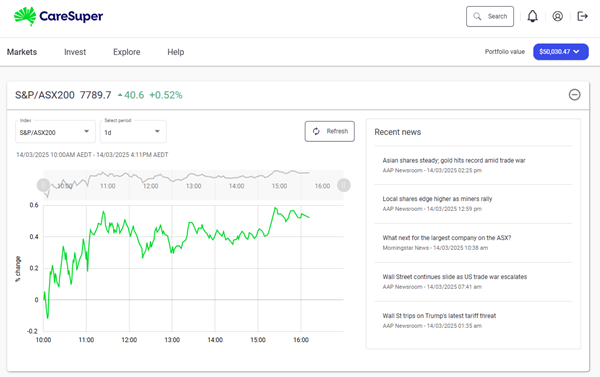
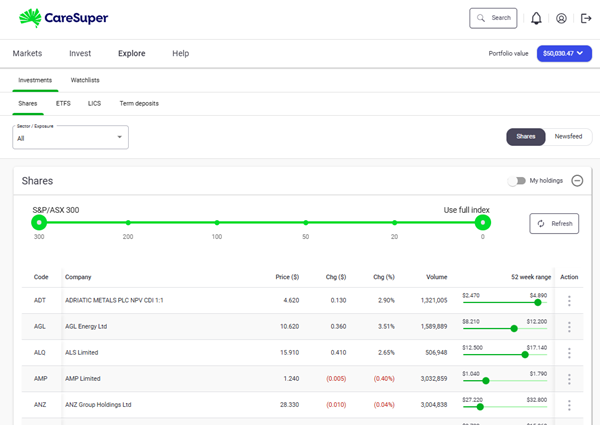
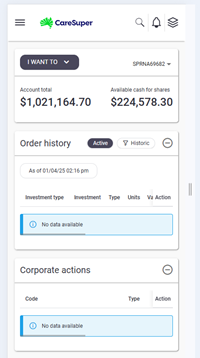
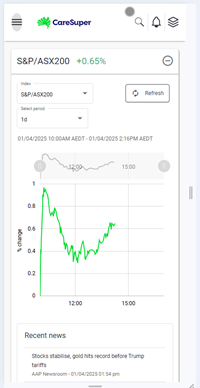
The DIO portal is provided by our DIO provider, FNZ. It’s mobile responsive, so you can access your DIO account on your phone or other mobile device.
To help you find your way around the FNZ portal, there’s a welcome tour which will appear the first time you log in to your DIO account. Make sure to check it out so you can familiarise yourself with how the portal works.
You can also find virtual tours of the FNZ portal from the ‘Help’ menu as well as handy FAQs and a glossary, to help you learn where to find information and request transactions.
The DIO portal is user-friendly portal with an intuitive interface.
If you have a CareSuper super account, you may be able to transfer your existing DIO investments into a Flexible Income account. This way you don’t need to sell your DIO investments and buy them again in your new Flexible Income account.
You can only transfer your DIO investments from super to Flexible Income if you’re transferring your entire account balance. If you’re transferring your entire CareSuper super account balance into a Flexible Income account, we’ll automatically transfer your existing DIO investments into your Flexible Income account.
If you’re only transferring part of your super account into a Flexible Income account, you’ll need to either keep your existing DIO investments in your CareSuper super account, or sell your DIO investments before your partial transfer can occur. Please note that minimum account balance rules apply to keeping your CareSuper super account open. Contact us for more information.
Eligibility criteria apply to Flexible Income accounts. You should consider our Retirement Income PDS when deciding whether to acquire this product.
For more details, read the Direct Investment option guide.
You can request to close your DIO account through the DIO portal which you can access via Member Online.
When you do, all available funds in your DIO Transaction (cash) account, including the required $500 minimum balance, will be transferred to your other CareSuper investment options, and your DIO account will be closed.
Before requesting a full closure, please ensure that all your investment proceeds have cleared into your DIO Transaction account. If some assets take longer to settle than others, you can still make partial transfers to your non-DIO investments—just note that you’ll have to maintain the $500 minimum balance in your DIO Transaction account until the full transfer is complete.
Processing times can vary, especially if you're waiting on term deposits, dividends, or corporate actions. If you're planning to leave the DIO or need access to your super quickly, it's a good idea to allow some extra time, as certain delays and trading restrictions may be outside of our control.
Here’s a step-by-step guide:
Log in to Member Online and go to the DIO portal.

Once you’re in the DIO portal, select the profile icon in the top right-hand corner, then click ‘Close my account’.

You’ll be shown a pop-up screen.

To close your DIO account, you must
- sell all listed securities you’re invested in
- not be holding any term deposits
- not be holding listed securities that are linked to an unfinalised corporate action
- not be holding any suspended or delisted assets
- ensure all DIO proceeds are in your DIO Transaction account.
You’ll be presented with two prompts, and you’ll need to confirm you want to close your DIO account to continue.


2. Wait for the money to settle
After selling, the money from your investments will go into your DIO Transaction account. This can take a few days—especially for listed securities (which take 2 business days to settle) or term deposits (which may take up to 10 days if ended early). We’ll notify members once it’s approved.
3. Transfer the money out your DIO Transaction account
Once all your money is in the DIO transaction account, you can transfer it out into your other CareSuper investment options using the DIO portal via Member Online. Funds will transfer into your other non-DIO investment options in line with your future transaction nomination (which you can change in Member Online if you wish).
The cut-off time to transfer funds out of the DIO is 4pm AEST/AEDT on a business day. Requests received after the cut-off times or submitted online on a national public holiday or weekend will be processed effective the following business day.
4. Final tax check
A final tax calculation is done. If you made a profit or loss, this will be added to or taken from your account. If you’re closing your CareSuper super account completely, you can:
- take your money out straight away (but you might miss out on some tax benefits), or
- leave at least $6,000 in your account until the final tax adjustment is done (usually in February).
5. Account closure
Your DIO account is officially closed once your DIO Transaction account is empty and no investments remain. Until then, the DIO administration fee will still apply.
For more information on how to exit the DIO, contact us or refer to the Direct Investment option guide.
More information about the DIO and the DIO portal is available here: